Form Input
Demonstrates form widgets, text entry fields, and input validation.
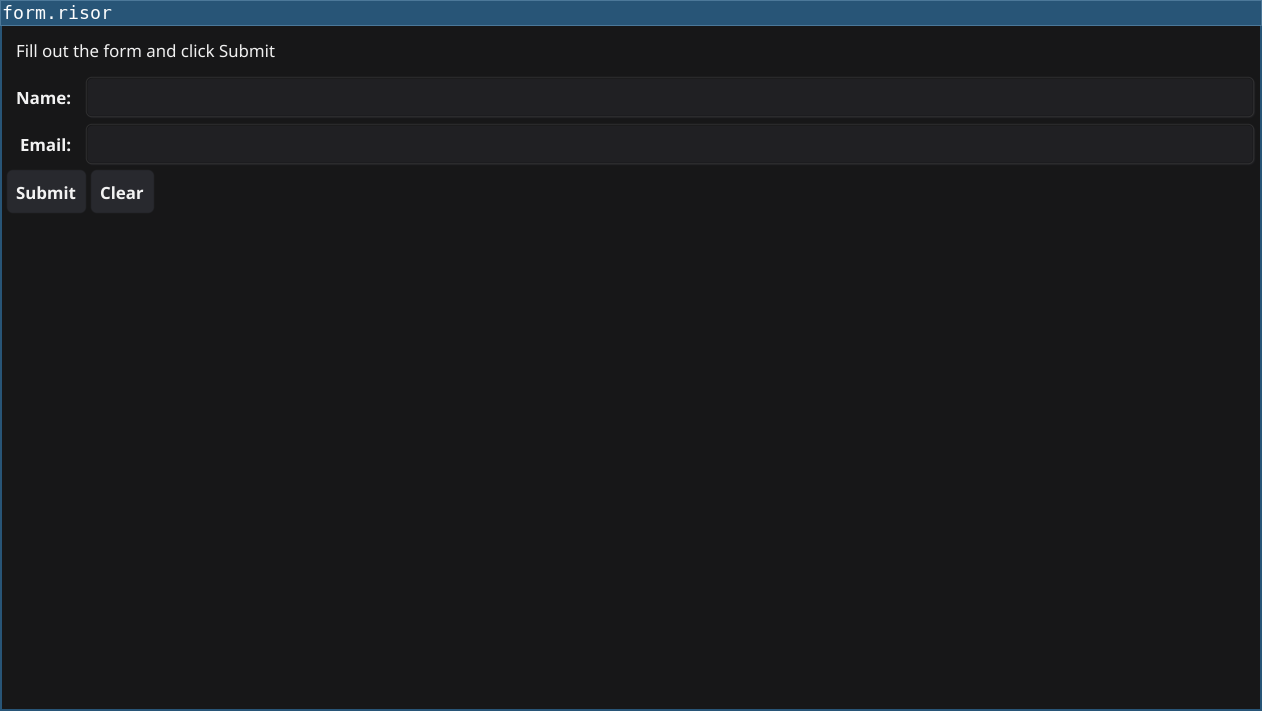
Features
- Creates a registration form with name and email fields using
widget.NewForm() - Validates user input when the submit button is clicked
- Shows error messages for invalid input
- Displays success message when validation passes
- Provides a clear button to reset the form
Code
// Form input example
// Demonstrates form widgets, entry fields, and input validation

require("v0.2")

let nameEntry = widget.NewEntry()
let emailEntry = widget.NewEntry()

let titel = widget.NewLabel("Fill out the form and click Submit")
let resultLabel = widget.NewLabel("")

let submitButton = widget.NewButton("Submit", () => {
    let name = nameEntry.Text
    let email = emailEntry.Text

    // Simple validation
    if (name == "") {
        resultLabel.Text = "Error: Name is required"
        return
    }

    if (email == "") {
        resultLabel.Text = "Error: Email is required"
        return
    }

    if (!email.contains("@")) {
        resultLabel.Text = "Error: Email must contain @"
        return
    }

    // If validation passes
    resultLabel.Text = `Success! Name: ${name}, Email: ${email}`
})

let clearButton = widget.NewButton("Clear", () => {
    nameEntry.Text = ""
    emailEntry.Text = ""
    resultLabel.Text = "Fill out the form and click Submit"
})

widget.NewLabel("User Registration")

// Create form layout
let items = [
    widget.NewFormItem("Name:", nameEntry),
    widget.NewFormItem("Email:", emailEntry),
]

let content = container.NewVBox(
	titel,
	widget.NewForm(items),
    container.NewHBox(submitButton, clearButton),
	resultLabel,
)

window.SetContent(content)
Running
cd examples/03-form-input
go run main.go
Or with the fynerisor CLI:
fynerisor script.risor