Constants
Comprehensive demonstration of all Fyne constants and enums available through the constants global object.
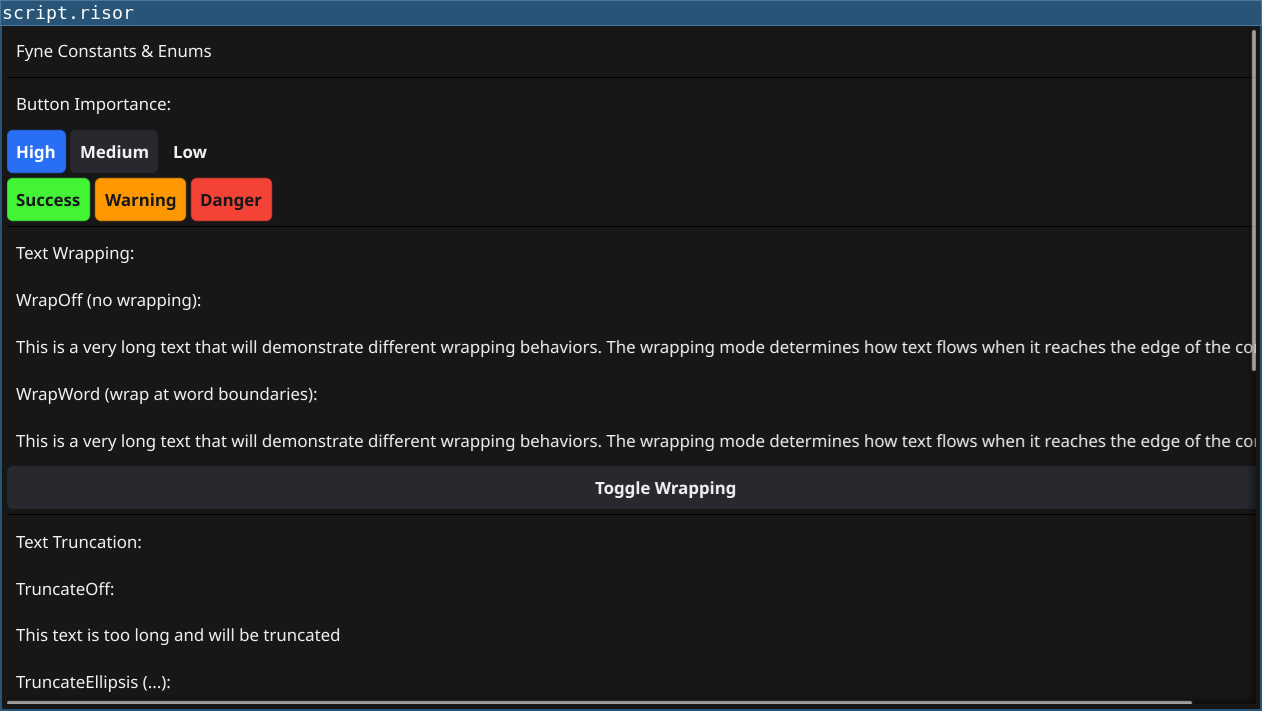
Features
- Standard: ImportanceHigh, ImportanceMedium, ImportanceLow
- Semantic: SuccessImportance, WarningImportance, DangerImportance
Code
require(["v0.3", "@gui"])

let statusLabel = widget.NewLabel("Explore all available Fyne constants")

// ===== Button Importance Examples =====
let importanceSection = widget.NewLabel("Button Importance:")

let highBtn = widget.NewButton("High", () => {
	statusLabel.SetText("High importance button clicked")
})
highBtn.Importance = constants.ImportanceHigh

let medBtn = widget.NewButton("Medium", () => {
	statusLabel.SetText("Medium importance button clicked")
})
medBtn.Importance = constants.ImportanceMedium

let lowBtn = widget.NewButton("Low", () => {
	statusLabel.SetText("Low importance button clicked")
})
lowBtn.Importance = constants.ImportanceLow

let successBtn = widget.NewButton("Success", () => {
	statusLabel.SetText("Success action!")
})
successBtn.Importance = constants.SuccessImportance

let warningBtn = widget.NewButton("Warning", () => {
	statusLabel.SetText("Warning action!")
})
warningBtn.Importance = constants.WarningImportance

let dangerBtn = widget.NewButton("Danger", () => {
	statusLabel.SetText("Danger action!")
})
dangerBtn.Importance = constants.DangerImportance

let importanceBox = container.NewVBox(
	importanceSection,
	container.NewHBox(highBtn, medBtn, lowBtn),
	container.NewHBox(successBtn, warningBtn, dangerBtn)
)

// ===== Text Wrapping Examples =====
let wrapSection = widget.NewLabel("Text Wrapping:")

let longText = "This is a very long text that will demonstrate different wrapping behaviors. The wrapping mode determines how text flows when it reaches the edge of the container."

let wrapOffLabel = widget.NewLabel(longText)
wrapOffLabel.Wrapping = constants.TextWrapOff

let wrapBreakLabel = widget.NewLabel(longText)
wrapBreakLabel.Wrapping = constants.TextWrapBreak

let wrapWordLabel = widget.NewLabel(longText)
wrapWordLabel.Wrapping = constants.TextWrapWord

let wrapToggle = widget.NewButton("Toggle Wrapping", () => {
	if (wrapOffLabel.Wrapping == constants.TextWrapOff) {
		wrapOffLabel.Wrapping = constants.TextWrapWord
		statusLabel.SetText("Changed to TextWrapWord")
	} else {
		wrapOffLabel.Wrapping = constants.TextWrapOff
		statusLabel.SetText("Changed to TextWrapOff")
	}
})

let wrapBox = container.NewVBox(
	wrapSection,
	widget.NewLabel("WrapOff (no wrapping):"),
	wrapOffLabel,
	widget.NewLabel("WrapWord (wrap at word boundaries):"),
	wrapWordLabel,
	wrapToggle
)

// ===== Text Truncation Examples =====
let truncSection = widget.NewLabel("Text Truncation:")

let truncText = "This text is too long and will be truncated"

let truncOffLabel = widget.NewLabel(truncText)
truncOffLabel.Truncation = constants.TextTruncateOff

let truncClipLabel = widget.NewLabel(truncText)
truncClipLabel.Truncation = constants.TextTruncateClip

let truncEllipsisLabel = widget.NewLabel(truncText)
truncEllipsisLabel.Truncation = constants.TextTruncateEllipsis

let truncBox = container.NewVBox(
	truncSection,
	widget.NewLabel("TruncateOff:"),
	truncOffLabel,
	widget.NewLabel("TruncateEllipsis (...):"),
	truncEllipsisLabel
)

// ===== Scroll Direction Examples =====
let scrollSection = widget.NewLabel("Scroll Direction:")

let scrollContent = widget.NewLabel("Scroll directions control how containers handle overflow.\n\nScrollBoth: Horizontal & Vertical\nScrollHorizontalOnly: Left/Right only\nScrollVerticalOnly: Up/Down only\nScrollNone: No scrolling")

let scrollInfo = widget.NewLabel("Values: ScrollBoth=0, ScrollHorizontalOnly=1, ScrollVerticalOnly=2, ScrollNone=3")

let scrollBox = container.NewVBox(
	scrollSection,
	scrollContent,
	scrollInfo
)

// ===== Button Alignment Examples =====
let alignSection = widget.NewLabel("Button Alignment:")

let alignInfo = widget.NewLabel("ButtonAlignCenter, ButtonAlignLeading, ButtonAlignTrailing\n(Alignment controls horizontal positioning within button)")

let alignBox = container.NewVBox(
	alignSection,
	alignInfo
)

// ===== Orientation Examples =====
let orientSection = widget.NewLabel("Orientation:")

let orientInfo = widget.NewLabel("Horizontal=0, Vertical=1\n(Used for split containers and other layout widgets)")

let orientBox = container.NewVBox(
	orientSection,
	orientInfo
)

// ===== Constants Reference =====
let referenceBtn = widget.NewButton("Show All Constants", () => {
	let ref = "Button Importance: High, Medium, Low, Success, Warning, Danger\n"
	ref = ref + "Text Wrap: Off, Break, Word\n"
	ref = ref + "Text Truncate: Off, Clip, Ellipsis\n"
	ref = ref + "Scroll: Both, HorizontalOnly, VerticalOnly, None\n"
	ref = ref + "Button Align: Center, Leading, Trailing\n"
	ref = ref + "Button Icon: LeadingText, TrailingText\n"
	ref = ref + "Orientation: Horizontal, Vertical"
	statusLabel.SetText(ref)
})

// ===== Main Layout =====
let content = container.NewVBox(
	widget.NewLabel("Fyne Constants & Enums"),
	widget.NewSeparator(),
	importanceBox,
	widget.NewSeparator(),
	wrapBox,
	widget.NewSeparator(),
	truncBox,
	widget.NewSeparator(),
	scrollBox,
	widget.NewSeparator(),
	alignBox,
	widget.NewSeparator(),
	orientBox,
	widget.NewSeparator(),
	referenceBtn,
	widget.NewSeparator(),
	statusLabel
)

window.SetContent(container.NewScroll(content))
Running
cd examples/24-constants
go run main.go
Or with the fynerisor CLI:
fynerisor script.risor