HTTP Fetch
This example demonstrates using the HTTP module to fetch data from a REST API and display it in a Fyne GUI.
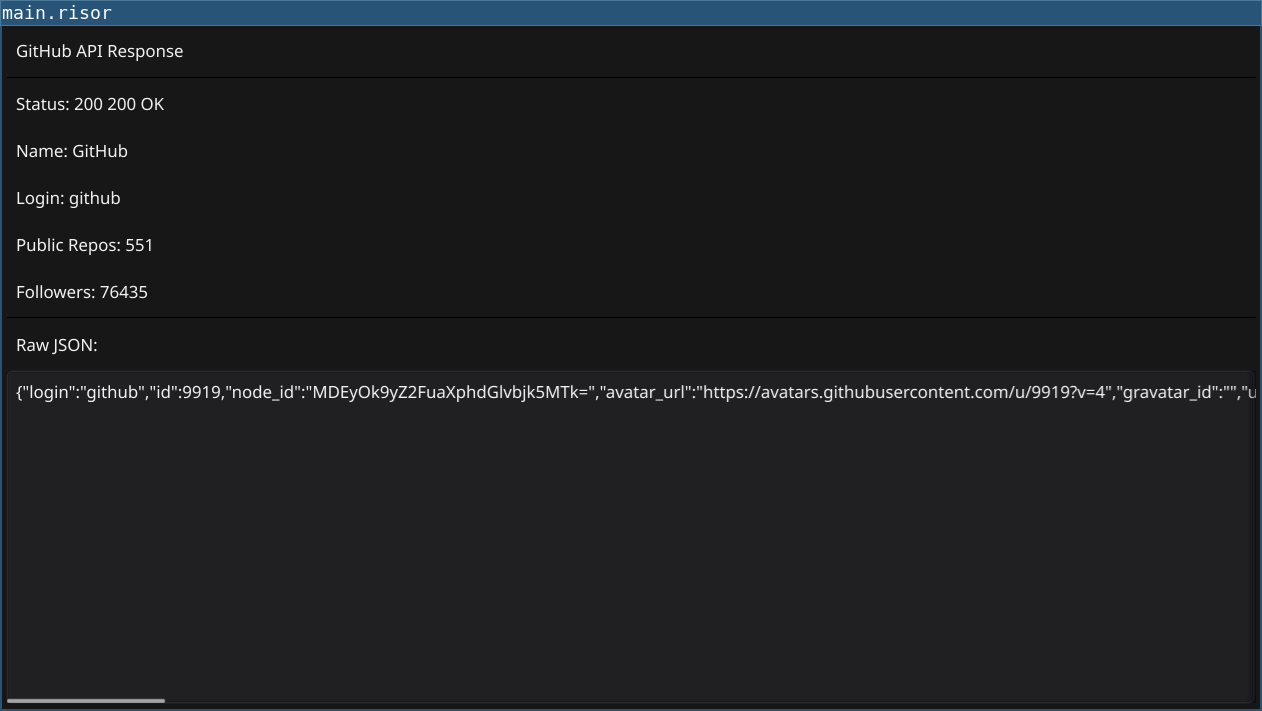
Features
- HTTP GET request to GitHub API
- JSON response parsing
- Status code display
- Dynamic content display
- Standalone Go application using fynerisor library
Code
// HTTP Fetch Example
// This example demonstrates using the http module to fetch data from an API
// and display it in the GUI.
//
// Run with: fynerisor --title "HTTP Fetch" examples/04-http-fetch/main.risor

require(["v0.2", "@http"])

// Fetch GitHub user data
let response = http.get("https://api.github.com/users/github")

// Parse JSON response
let data = response.json()

// Create labels with the parsed data
let statusLabel = widget.NewLabel("Status: " + string(response.status) + " " + response.statusText)
let nameLabel = widget.NewLabel("Name: " + data.name)
let loginLabel = widget.NewLabel("Login: " + data.login)
let publicReposLabel = widget.NewLabel("Public Repos: " + string(data.public_repos))
let followersLabel = widget.NewLabel("Followers: " + string(data.followers))

// Show raw body in a multiline text entry
let bodyEntry = widget.NewMultiLineEntry()
bodyEntry.SetText(response.body)

// Create a form with all the data
let infoForm = container.NewVBox(
    widget.NewLabel("GitHub API Response"),
    widget.NewSeparator(),
    statusLabel,
    nameLabel,
    loginLabel,
    publicReposLabel,
    followersLabel,
    widget.NewSeparator(),
    widget.NewLabel("Raw JSON:"),
)

let border = container.NewBorder(infoForm, nil, nil, nil, bodyEntry)

// Set the content
window.SetContent(border)
Running
cd examples/13-http-fetch
go run main.go
Or with the fynerisor CLI:
fynerisor script.risor