Table Widgets
This example demonstrates using widgets (buttons, entries, etc.) inside table cells instead of just strings.
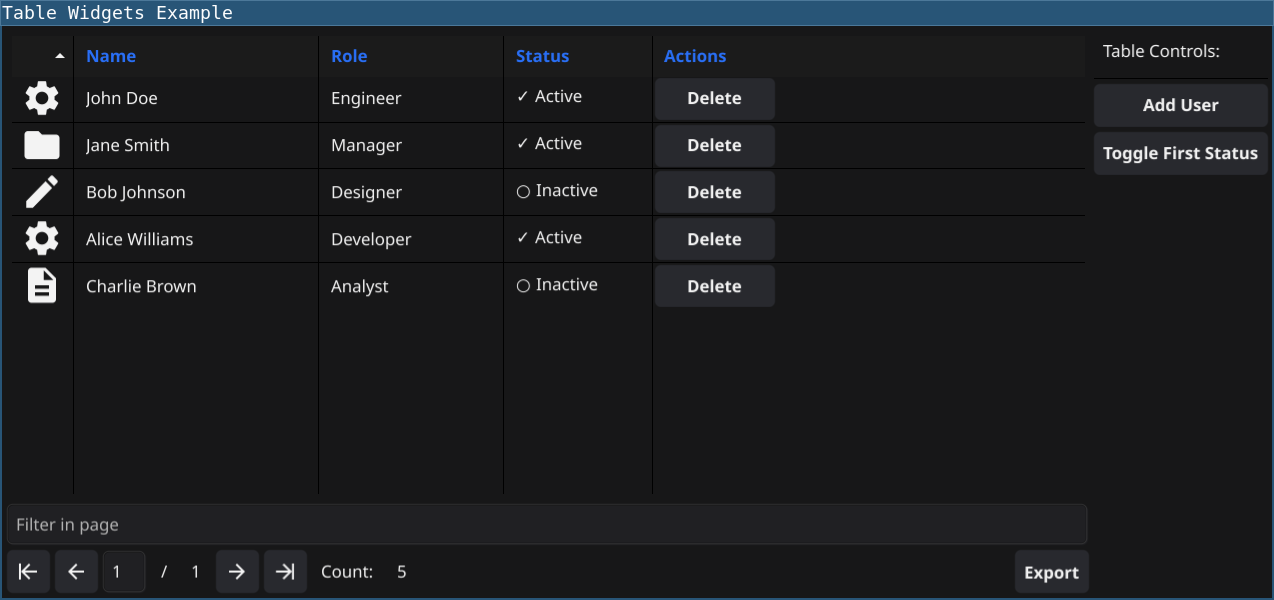
Features
- Called once per cell when the table is initialized
- Return the appropriate widget type for each column
- Think of it as a factory that creates the cell template
- Called whenever the table needs to display or refresh data
- Configure the widget with the appropriate data for that row/column
Code
require(["v0.6"])

// Sample data with user information
// Use a map to hold mutable state
let state = {
    users: [
        {name: "John Doe", role: "Engineer", status: "Active"},
        {name: "Jane Smith", role: "Manager", status: "Active"},
        {name: "Bob Johnson", role: "Designer", status: "Inactive"},
        {name: "Alice Williams", role: "Developer", status: "Active"},
        {name: "Charlie Brown", role: "Analyst", status: "Inactive"},
    ]
}

// Global delete function
let deleteUser = (name) => {
    window.SetStatus(sprintf("Deleting %s...", name))
    let before = len(state.users)

    // Filter users
    let newList = []
    state.users.each((u) => {
        if (u.name != name) {
            newList = newList.append(u)
        }
    })

    state.users = newList
    window.SetStatus(sprintf("Deleted %s (%d -> %d)", name, before, len(state.users)))
}

let table = widget.NewTable("User Management", 50)

// Set up table columns (added Icon column)
table.Columns(() => ["", "Name", "Role", "Status", "Actions"])

// Set row count
table.RowCount(() => len(state.users))

// Data callback - provides data for exports (CSV, JSON, XLSX)
// In widget mode, this data is also used for export functionality
table.Data((offset, limit) => {
    let rows = []
    let count = len(state.users) - offset
    if (count > limit) {
        count = limit
    }
    range(count).each((i) => {
        let user = state.users[offset + i]
        // Return actual data - this is used for exports
        rows = rows.append([
            "[Icon]",  // Icon column
            user.name,
            user.role,
            user.status,
            "[Button: Delete]"  // Button column
        ])
    })
    return rows
})

// CreateCell - called once per cell to create the widget
table.CreateCell((col, row) => {
    if (col == 0) {
        // Icon column: create an icon (resource set in UpdateCell)
        return widget.NewIcon("info")
    } else if (col == 4) {
        // Actions column: create a button (callback set in UpdateCell)
        return widget.NewButton("Delete", () => {})
    }
    // All other columns use labels
    return widget.NewLabel("")
})

// UpdateCell - called to populate/update the widget with data
table.UpdateCell((col, row, cell) => {
    if (row >= len(state.users)) {
        return
    }

    let user = state.users[row]

    if (col == 0) {
        // Icon column - show different icons based on role
        if (user.role == "Engineer" || user.role == "Developer") {
            cell.SetResource("settings")
        } else if (user.role == "Manager") {
            cell.SetResource("folder")
        } else if (user.role == "Designer") {
            cell.SetResource("documentCreate")
        } else {
            cell.SetResource("document")
        }
    } else if (col == 1) {
        // Name column
        cell.SetText(user.name)
    } else if (col == 2) {
        // Role column
        cell.SetText(user.role)
    } else if (col == 3) {
        // Status column with icon prefix
        if (user.status == "Active") {
            cell.SetText("✓ " + user.status)
        } else {
            cell.SetText("○ " + user.status)
        }
    } else if (col == 4) {
        // Actions column - update button text and callback
        let name = user.name
        cell.SetText("Delete")
        cell.OnTapped(() => {
            deleteUser(name)
            table.Refresh()
        })
    }
})

// Set column widths
table.SetColumnWidth(0, 50.0)   // Icon
table.SetColumnWidth(1, 200.0)  // Name
table.SetColumnWidth(2, 150.0)  // Role
table.SetColumnWidth(3, 120.0)  // Status
table.SetColumnWidth(4, 100.0)  // Actions

// Refresh the table to trigger initial display
table.Refresh()

// Create a control panel with some buttons
let addUserBtn = widget.NewButton("Add User", () => {
    let newUser = {
        name: sprintf("User %d", len(state.users) + 1),
        role: "Employee",
        status: "Active"
    }
    state.users = state.users.append(newUser)
    table.Refresh()
    window.SetStatus(sprintf("Added new user: %s", newUser.name))
})

let toggleStatusBtn = widget.NewButton("Toggle First Status", () => {
    if (len(state.users) > 0) {
        if (state.users[0].status == "Active") {
            state.users[0].status = "Inactive"
        } else {
            state.users[0].status = "Active"
        }
        table.Refresh()
        window.SetStatus(sprintf("Toggled status for: %s", state.users[0].name))
    }
})

let controls = container.NewVBox([
    widget.NewLabel("Table Controls:"),
    widget.NewSeparator(),
    addUserBtn,
    toggleStatusBtn,
])

// Create main layout with table and controls
let mainLayout = container.NewBorder(nil, nil, nil, controls, table)

window.SetContent(mainLayout)
window.Resize(900, 500)
Running
cd examples/32-table-widgets
go run main.go
Or with the fynerisor CLI:
fynerisor script.risor