Icon, Hyperlink & Card
Demonstrates theme icons, clickable hyperlinks, and card layouts.
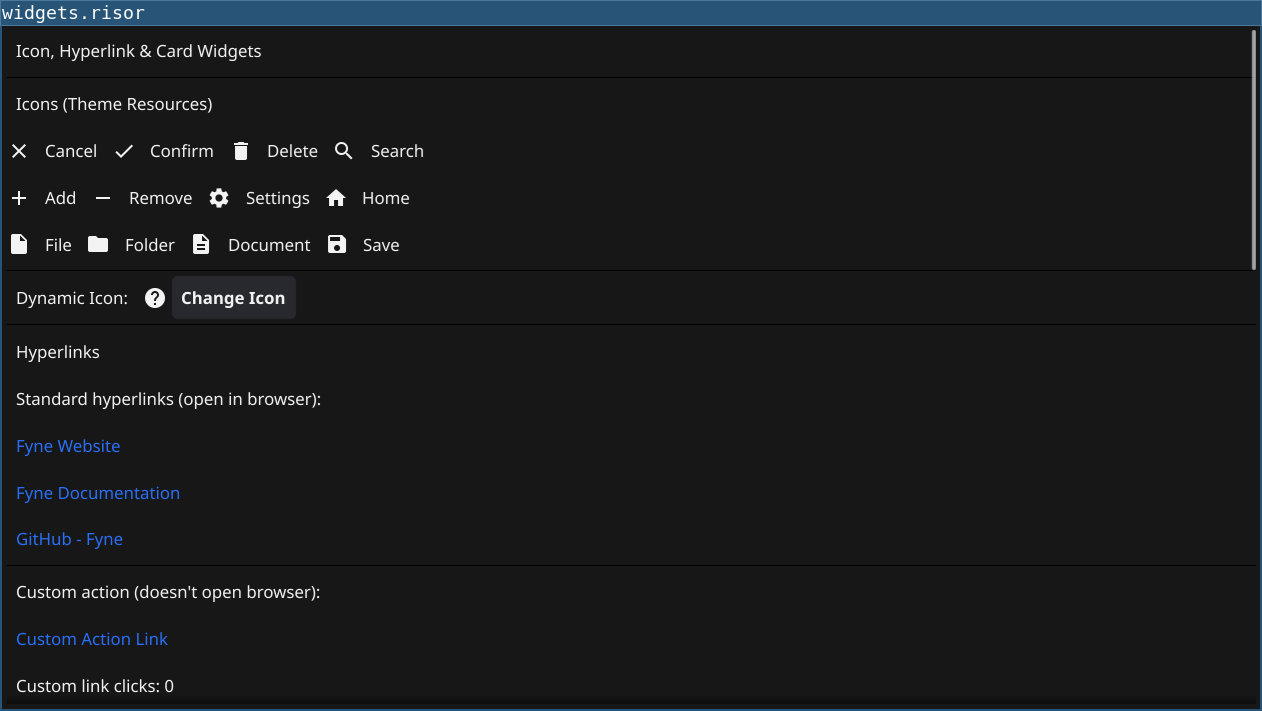
Features
- Shows Icon: widgets with 40+ built-in theme icons
- Demonstrates dynamic icon changes with SetResource()
- Shows Hyperlink: widgets that open URLs in browser
- Demonstrates custom OnTapped callbacks for links
- Shows dynamic hyperlink URL/text updates
Code
// Icon, Hyperlink, and Card widgets demonstration

require("v0.2")

let title = widget.NewLabel("Icon, Hyperlink & Card Widgets")

let separator1 = widget.NewSeparator()

// ===== ICON SECTION =====
let iconTitle = widget.NewLabel("Icons (Theme Resources)")

// Create various icons
let iconGrid = container.NewVBox(
    container.NewHBox(
        widget.NewIcon("cancel"),
        widget.NewLabel("Cancel"),
        widget.NewIcon("confirm"),
        widget.NewLabel("Confirm"),
        widget.NewIcon("delete"),
        widget.NewLabel("Delete"),
        widget.NewIcon("search"),
        widget.NewLabel("Search")
    ),
    container.NewHBox(
        widget.NewIcon("add"),
        widget.NewLabel("Add"),
        widget.NewIcon("remove"),
        widget.NewLabel("Remove"),
        widget.NewIcon("settings"),
        widget.NewLabel("Settings"),
        widget.NewIcon("home"),
        widget.NewLabel("Home")
    ),
    container.NewHBox(
        widget.NewIcon("file"),
        widget.NewLabel("File"),
        widget.NewIcon("folder"),
        widget.NewLabel("Folder"),
        widget.NewIcon("document"),
        widget.NewLabel("Document"),
        widget.NewIcon("documentSave"),
        widget.NewLabel("Save")
    )
)

// Dynamic icon example
let iconLabel = widget.NewLabel("Dynamic Icon:")
let dynamicIcon = widget.NewIcon("help")

let iconOptions = ["help", "info", "warning", "error", "question"]
let currentIconIndex = 0

let changeIconButton = widget.NewButton("Change Icon", () => {
    currentIconIndex = (currentIconIndex + 1) % len(iconOptions)
    let newIcon = iconOptions[currentIconIndex]
    dynamicIcon.SetResource(newIcon)
    iconLabel.Text = `Dynamic Icon: ${newIcon}`
})

let iconSection = container.NewVBox(
    iconTitle,
    iconGrid,
    widget.NewSeparator(),
    container.NewHBox(iconLabel, dynamicIcon, changeIconButton)
)

let separator2 = widget.NewSeparator()

// ===== HYPERLINK SECTION =====
let hyperlinkTitle = widget.NewLabel("Hyperlinks")

// Regular hyperlinks (open in browser)
let link1 = widget.NewHyperlink("Fyne Website", "https://fyne.io")
let link2 = widget.NewHyperlink("Fyne Documentation", "https://docs.fyne.io")
let link3 = widget.NewHyperlink("GitHub - Fyne", "https://github.com/fyne-io/fyne")

// Hyperlink with custom OnTapped
let clickCount = 0
let clickLabel = widget.NewLabel("Custom link clicks: 0")
let customLink = widget.NewHyperlink("Custom Action Link", "https://example.com")

customLink.OnTapped(() => {
    clickCount = clickCount + 1
    clickLabel.Text = `Custom link clicks: ${clickCount}`
})

// Dynamic hyperlink
let dynamicLinkLabel = widget.NewLabel("Dynamic Hyperlink:")
let dynamicLink = widget.NewHyperlink("Click Me", "https://example.com")
let urlEntry = widget.NewEntry()
urlEntry.Text = "https://fyne.io"

let updateLinkButton = widget.NewButton("Update Link", () => {
    dynamicLink.SetURL(urlEntry.Text)
    dynamicLink.SetText("Updated Link")
})

let hyperlinkSection = container.NewVBox(
    hyperlinkTitle,
    widget.NewLabel("Standard hyperlinks (open in browser):"),
    link1,
    link2,
    link3,
    widget.NewSeparator(),
    widget.NewLabel("Custom action (doesn't open browser):"),
    customLink,
    clickLabel,
    widget.NewSeparator(),
    dynamicLinkLabel,
    dynamicLink,
    widget.NewLabel("Enter new URL:"),
    urlEntry,
    updateLinkButton
)

let separator3 = widget.NewSeparator()

// ===== CARD SECTION =====
let cardTitle = widget.NewLabel("Cards")

// Simple card
let card1 = widget.NewCard(
    "Welcome Card",
    "This is a simple card with title and subtitle",
    widget.NewLabel("Card content goes here. Cards are great for grouping related information.")
)

// Card with more content
let card2Content = container.NewVBox(
    widget.NewLabel("This card has multiple widgets in its content:"),
    widget.NewButton("Action Button", () => {
        print("Card button clicked!")
    }),
    widget.NewLabel("You can put any widget inside a card.")
)

let card2 = widget.NewCard(
    "Interactive Card",
    "With multiple widgets",
    card2Content
)

// Card with icon
let card3Icon = widget.NewIcon("documentSave")
let card3Content = container.NewVBox(
    container.NewHBox(card3Icon, widget.NewLabel("Document saved successfully")),
    widget.NewLabel("Your changes have been saved to disk.")
)

let card3 = widget.NewCard(
    "Status Card",
    "Save completed",
    card3Content
)

// Dynamic card
let card4 = widget.NewCard(
    "Dynamic Card",
    "Content can be updated",
    widget.NewLabel("Initial content")
)

let updateTitleEntry = widget.NewEntry()
updateTitleEntry.Text = "New Title"

let updateSubtitleEntry = widget.NewEntry()
updateSubtitleEntry.Text = "New Subtitle"

let updateCount = 0

let updateCardButton = widget.NewButton("Update Card", () => {
    updateCount = updateCount + 1
    card4.SetTitle(updateTitleEntry.Text)
    card4.SetSubTitle(updateSubtitleEntry.Text)
    card4.SetContent(widget.NewLabel(`Updated ${updateCount} times`))
})

let cardSection = container.NewVBox(
    cardTitle,
    card1,
    card2,
    card3,
    widget.NewSeparator(),
    card4,
    widget.NewLabel("Update card properties:"),
    container.NewHBox(widget.NewLabel("Title:"), updateTitleEntry),
    container.NewHBox(widget.NewLabel("Subtitle:"), updateSubtitleEntry),
    updateCardButton
)

// Main layout
let content = container.NewVBox(
    title,
    separator1,
    iconSection,
    separator2,
    hyperlinkSection,
    separator3,
    cardSection
)

let scrollable = container.NewScroll(content)
window.SetContent(scrollable)
Running
cd examples/06-icon-hyperlink-card
go run main.go
Or with the fynerisor CLI:
fynerisor script.risor