Popup Menu
Demonstrates PopUp widgets - floating overlays above the main UI.
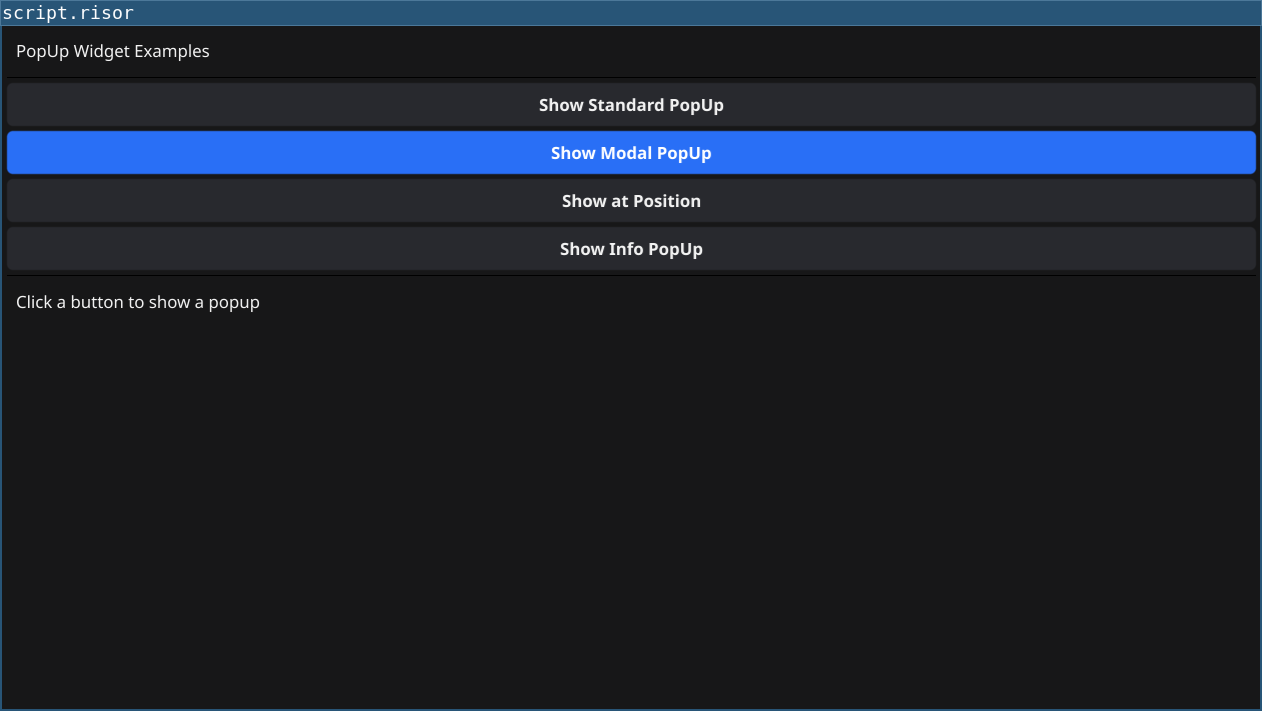
Features
- Standard PopUp: Non-modal, allows background interaction
- Modal PopUp: Blocks background interaction until closed
- Positioned PopUp: Show at specific screen coordinates
- Info Dialogs: Common use case for notifications
Code
require(["v0.3", "@gui"])

let statusLabel = widget.NewLabel("Click a button to show a popup")

// Create popup content (will be reused)
let createPopupContent = (title, onClose) => {
	let titleLabel = widget.NewLabel(title)
	let messageLabel = widget.NewLabel("This is a floating popup window!")

	let closeBtn = widget.NewButton("Close", onClose)
	closeBtn.Importance = constants.ImportanceLow

	return container.NewVBox(
		titleLabel,
		widget.NewSeparator(),
		messageLabel,
		closeBtn
	)
}

// Standard popup (non-modal, doesn't block interaction)
let standardPopup = nil
let standardBtn = widget.NewButton("Show Standard PopUp", () => {
	standardPopup = widget.NewPopUp(
		createPopupContent("Standard PopUp", () => {
			standardPopup.Hide()
			statusLabel.SetText("Standard popup closed")
		}),
		window.Canvas
	)
	standardPopup.Show()
	statusLabel.SetText("Standard popup shown (non-modal)")
})

// Modal popup (blocks interaction with background)
let modalPopup = nil
let modalBtn = widget.NewButton("Show Modal PopUp", () => {
	modalPopup = widget.NewModalPopUp(
		createPopupContent("Modal PopUp", () => {
			modalPopup.Hide()
			statusLabel.SetText("Modal popup closed")
		}),
		window.Canvas
	)
	modalPopup.Show()
	statusLabel.SetText("Modal popup shown (blocks background)")
})
modalBtn.Importance = constants.ImportanceHigh

// Popup at specific position
let positionPopup = nil
let positionBtn = widget.NewButton("Show at Position", () => {
	positionPopup = widget.NewPopUp(
		createPopupContent("Positioned PopUp", () => {
			positionPopup.Hide()
			statusLabel.SetText("Positioned popup closed")
		}),
		window.Canvas
	)
	// Show at specific screen coordinates
	positionPopup.ShowAtPosition(100, 100)
	statusLabel.SetText("Popup shown at position (100, 100)")
})

// Simple info popup
let infoPopup = nil
let infoBtn = widget.NewButton("Show Info PopUp", () => {
	let infoLabel = widget.NewLabel("This is an informational popup with a longer message to demonstrate text wrapping in popups.")

	let content = container.NewVBox(
		widget.NewLabel("Information"),
		widget.NewSeparator(),
		infoLabel,
		widget.NewButton("OK", () => {
			infoPopup.Hide()
			statusLabel.SetText("Info popup closed")
		})
	)

	infoPopup = widget.NewModalPopUp(content, window.Canvas)
	infoPopup.Show()
	statusLabel.SetText("Info popup shown")
})

let layout = container.NewVBox(
	widget.NewLabel("PopUp Widget Examples"),
	widget.NewSeparator(),
	standardBtn,
	modalBtn,
	positionBtn,
	infoBtn,
	widget.NewSeparator(),
	statusLabel
)

window.SetContent(layout)
Running
cd examples/22-popup
go run main.go
Or with the fynerisor CLI:
fynerisor script.risor