Tree Widget
Demonstrates the Tree widget with hierarchical data structures.
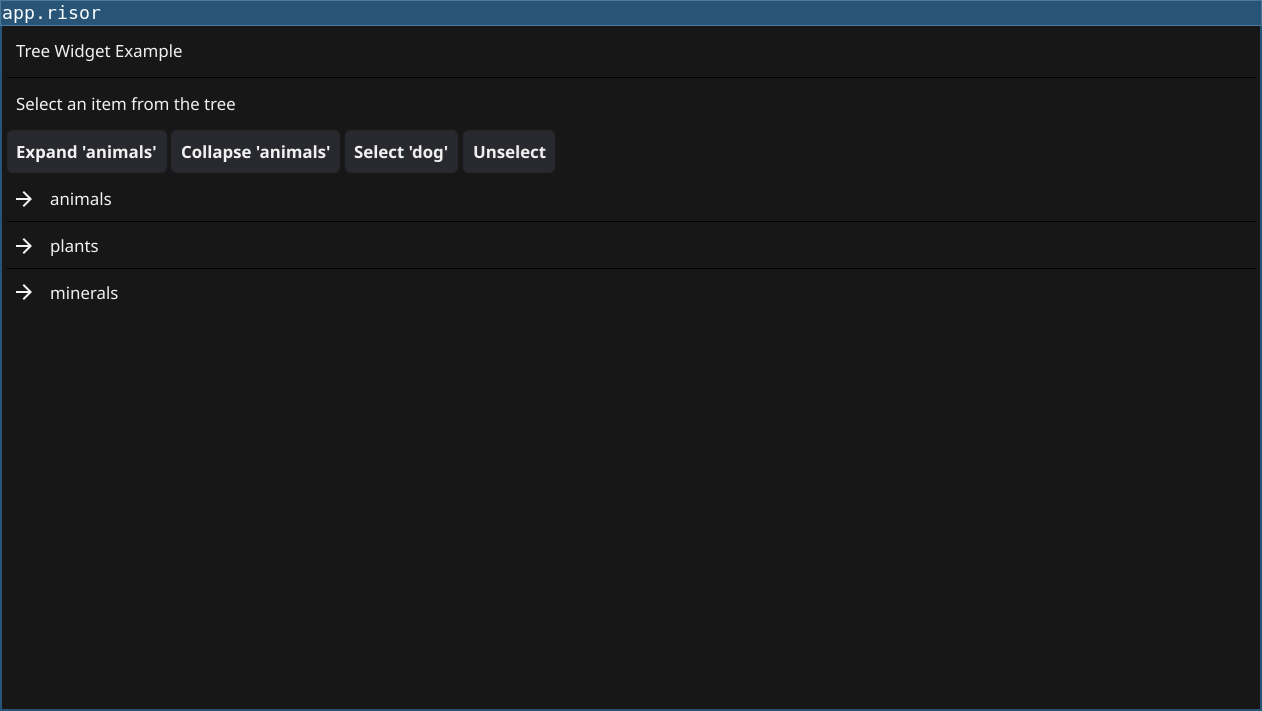
Features
- Hierarchical data display - Show nested parent-child relationships
- Expand/collapse branches - Interactive tree navigation
- Selection handling - Respond to user selections
- Programmatic control - Open, close, select nodes from code
- Custom rendering - Define how each node is displayed
Code
// Tree Widget Example
// Demonstrates the Tree widget with hierarchical data

// Require fynerisor v0.2+ for Tree widget
require("v0.2")

// Sample hierarchical data structure
let treeData = {
    "": ["animals", "plants", "minerals"],
    "animals": ["mammals", "birds", "fish"],
    "mammals": ["dog", "cat", "elephant"],
    "birds": ["eagle", "parrot", "penguin"],
    "fish": ["salmon", "tuna", "goldfish"],
    "plants": ["trees", "flowers", "vegetables"],
    "trees": ["oak", "pine", "maple"],
    "flowers": ["rose", "tulip", "daisy"],
    "vegetables": ["carrot", "broccoli", "tomato"],
    "minerals": ["iron", "copper", "gold"]
}

// Create status label
let statusLabel = widget.NewLabel("Select an item from the tree")

// Create the tree widget
let tree = widget.NewTree()

// Set the ChildUIDs callback - returns children for a given node
tree.ChildUIDs((uid) => {
    let children = treeData.get(uid)
    if (children == nil) {
        return []
    }
    return children
})

// Set the IsBranch callback - determines if a node has children
tree.IsBranch((uid) => {
    let children = treeData.get(uid)
    return children != nil
})

// Set the CreateNode callback - creates template widget for each node
tree.CreateNode((branch) => {
    return widget.NewLabel("")
})

// Set the UpdateNode callback - updates a specific node
tree.UpdateNode((uid, branch, item) => {
    // uid is the node ID, branch is whether it has children, item is the Label widget
    if (uid == "") {
        item.Text = "Root"
    } else {
        item.Text = uid
    }
})

// Set the selection callback
tree.OnSelected((uid) => {
    if (uid == "") {
        statusLabel.Text = "Selected: Root"
    } else {
        statusLabel.Text = `Selected: ${uid}`
    }
    print(`Selected node: ${uid}`)
})

// Set the unselection callback
tree.OnUnselected((uid) => {
    statusLabel.Text = "No selection"
    print(`Unselected node: ${uid}`)
})

// Create buttons for tree manipulation
let expandBtn = widget.NewButton("Expand 'animals'", () => {
    tree.OpenBranch("animals")
})

let collapseBtn = widget.NewButton("Collapse 'animals'", () => {
    tree.CloseBranch("animals")
})

let selectBtn = widget.NewButton("Select 'dog'", () => {
    tree.Select("dog")
})

let unselectBtn = widget.NewButton("Unselect", () => {
    tree.Unselect("dog")
})

// Layout
let title = widget.NewLabel("Tree Widget Example")
let buttonRow = container.NewHBox(expandBtn, collapseBtn, selectBtn, unselectBtn)

let layout = container.NewBorder(
    container.NewVBox(title, widget.NewSeparator(), statusLabel, buttonRow),
    nil,
    nil,
    nil,
    tree
)

window.SetContent(layout)
Running
cd examples/12-tree
go run main.go
Or with the fynerisor CLI:
fynerisor app.risor